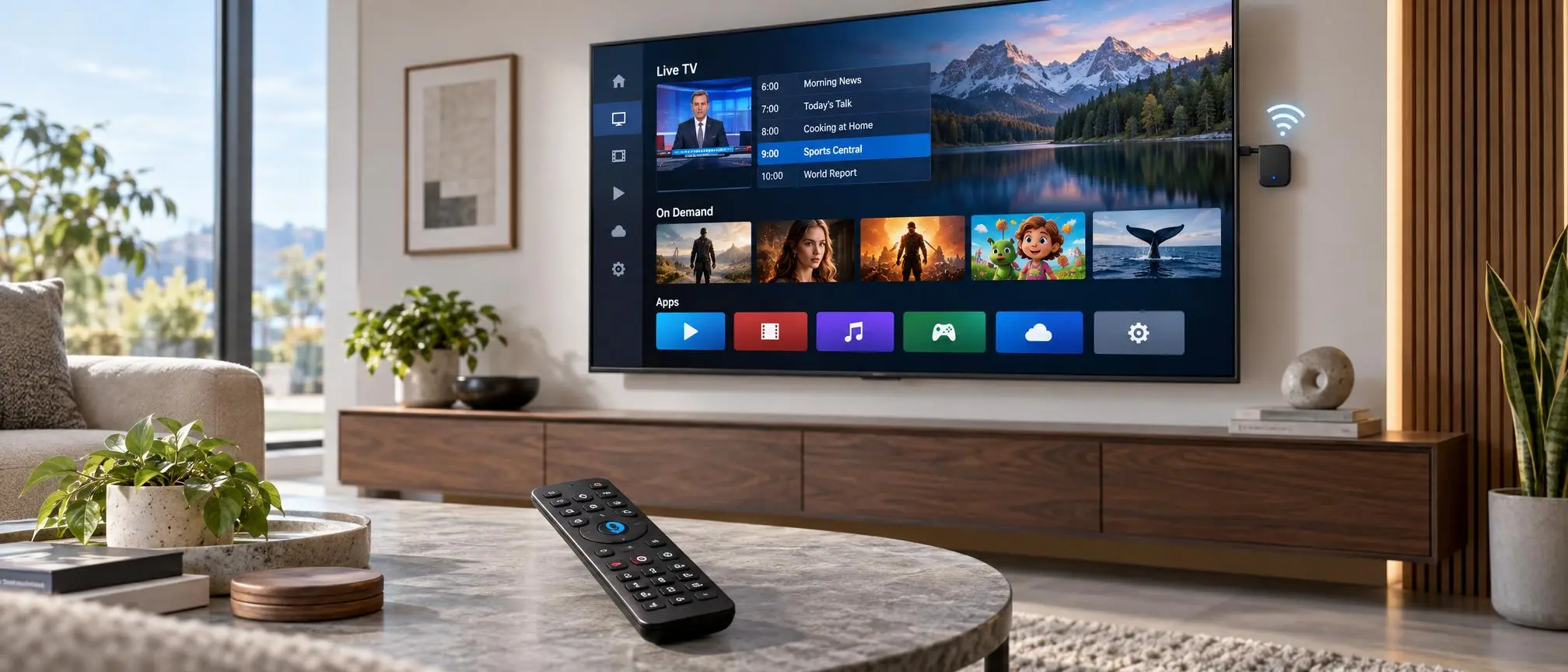

Gemini Air is a compact streaming device from DIRECTV. Instead of using a traditional receiver box, Gemini device connects directly to your television via HDMI and uses your home internet to stream content. It offers live TV, on-demand content, streaming apps, and provides voice controls.
Viewers can opt for the Gemini Air to experience DIRECTV with less bulky equipment. The device is compatible with 4K content and Google Assistant. It also supports various streaming apps and gives users a traditional DIRECTV remote.
If you are considering DIRECTV via the Internet, understanding how Gemini works and its pros and cons can help you determine if the device meets your home entertainment needs.
What Is Gemini Air?
Gemini Air is an HDMI streaming dongle from DIRECTV. It can connect your home Wi-Fi and your television to access the DIRECTV service, recordings, and on-demand content. You can also access other supported streaming services and apps from the interface.
Gemini device and other streaming services allow users to access multiple entertainment apps and streaming services. However, the user will need a subscription to access certain streaming services.
One of the major differences between a traditional television receiver and Gemini device is its size. The compact design of the device allows it to be placed behind the television, making it a great option if you wall-mount your television.
How Does Gemini Air Work?
Gemini Air is a streaming dongle that plugs into an HDMI port on your television. It connects to your home Wi-Fi and provides access to the DIRECTV channels, recordings, on-demand content, and supported streaming services.
What is the Gemini Air System?
Gemini Air uses your broadband connection to provide TV programming, so there is no need to use a traditional Receiver system. The device is connected to your TV using an HDMI connection and communicates with your broadband connection via Wi-Fi. You need to connect the device to your Wi-Fi, pair the remote, and sign in to your DIRECTV account.
A Google account may not always be required to view basic DIRECTV. However, you may need to use your Google account to access Google Assistant or additional Google Play apps.
Because it depends on the broadband connection, the overall performance of the Gemini system depends on the speed and quality of your home Wi-Fi.
Key Features of Gemini Air
There are several features in Gemini device that provides traditional TV control and enhanced streaming control.
Compact HDMI Design
Unlike a full-size Receiver, Gemini device can be placed behind the TV and is out of sight. This gives a neat and clean look to your entertainment center, as there are less cables and devices are placed in front of the TV.
USER INTERFACE
The remote has a QWERTY keyboard and features Channel buttons, a number pad, Guide button, Record button, Home button, and traditional playback controls.
Google Assistant
Gemini Air works with Google Assistant to do a variety of supported tasks.
4K Support
Gemini device can stream supported 4K content, if your TV supports 4K and you have 4K content.
While not every channel and program is offered in 4K, pictures can be displayed in 4K, when the content is available, and your television and internet allow it.
Streaming Apps
The device is capable of supporting numerous popular streaming apps, allowing for a seamless transition between DIRECTV and streaming services without needing to switch HDMI inputs.
Gemini Air Setup
Gemini Air is designed for a fairly simple self-installation.
Step 1: Connect the Device
Simply connect Gemini Air to a TV via available HDMI port.
Step 2: Connect Power
Then, connect Gemini device to a power source, via the provided power cable.
Step 3: Select the HDMI Input
Turn on TV, and select the HDMI source that is connected to Gemini Air.
Step 4: Pair the Remote
Next, follow the on-screen directions to pair the DIRECTV remote to the Gemini Air device.
Step 5: Connect to Wi-Fi
Next, select the wireless network, and enter the password, to connect Gemini device to the internet.
Gemini Air will download any available updates.
Step 6: Sign In
Enter your DIRECTV account details and complete any remaining setup steps or software updates.Once setup is complete, users can start watching DIRECTV content and configuring additional apps.
Does Gemini Air Support 4K?
Gemini Air supports 4K, however, not every show and channel is offered in 4K. There are a variety of factors that affect picture quality including the internet, television, programming, and other factors.
Users most likely to utilize this feature are those that regularly watch movies and sports or high resolution TV programming. Gemini is not limited to the DIRECTV programming.
What Apps Are Available on Gemini Air?
Gemini Air is not limited to DIRECTV programming.
Users can access a range of supported streaming applications, including services such as:
- Netflix
- Disney+
- Prime Video
- Hulu
- Peacock
- YouTube
- Max
Additional compatible applications may also be available through Google Play.
Keep in mind that Gemini device does not automatically include subscriptions to these services. If an app requires a paid membership, you will normally need an active subscription.
The advantage is convenience. Instead of switching between several streaming devices, users can manage much of their entertainment through one interface.
Gemini Air Remote
The Gemini Air remote is one of the device’s strongest features.
Many popular streaming devices use extremely simple remotes with only a few navigation buttons. Gemini device takes a more traditional television approach.
Its remote includes channel controls, a numeric keypad, Guide, Record, List, playback buttons, navigation controls, and voice functionality.
For viewers who frequently watch live television, this layout may feel more natural than navigating channels entirely through app menus.
The remote can also work with compatible television and audio equipment, which may reduce the need to keep several remotes nearby.
Gemini Air Price
Gemini Air pricing depends on your DIRECTV plan, account status, and current equipment offers.
DIRECTV commonly provides equipment through a lease structure rather than selling Gemini Air as a standard retail streaming stick.
Some qualifying customers may receive their first device without an additional monthly equipment charge, while extra devices can involve additional monthly fees.
Because DIRECTV promotions and equipment policies can change, customers should confirm the latest Gemini price directly through DIRECTV before ordering additional hardware.
Gemini Air vs. Gemini
The standard Gemini devices and gemini air provide many of the same core features, but their hardware designs are different.
| Feature | Gemini Air | Gemini |
| Design | HDMI dongle | Separate receiver |
| DIRECTV interface | Yes | Yes |
| Voice remote | Yes | Yes |
| Streaming apps | Yes | Yes |
| 4K support | Yes | Yes |
| Wi-Fi | Yes | Yes |
| Compact design | Excellent | Larger device |
Gemini is particularly attractive when space matters because the hardware can stay behind the television.
However, users who prefer a more traditional receiver-style setup or require different networking options may prefer another Gemini device.
Common Gemini Air Problems.
Internet and HDMI connections, as well as software and remote pairing, are some of the reasons the device becomes unresponsive or streaming becomes unstable. The first thing to check should be your Wi-Fi connection and ensure your device is not overheating.
Restarting the device is often the solution to software and connection problems. Gemini has problems with connection to the television. Ensure you are using the correct HDMI input and port and try another HDMI port to see if that improves the connection.
Remote problems may be resolved by ensuring the batteries are good and/or by repairing the remote.
A factory reset may be a last resort for persistent issues, however, it should be considered only after basic troubleshooting as some settings will need to be configured again.
Gemini Air Pros and Cons
Gemini offers several advantages, especially for existing DIRECTV users.
Pros
- Compact design
- Traditional DIRECTV remote
- Voice control support
- Compatible 4K streaming
- Access to popular streaming apps
- Integrated live TV and streaming experience
- Simple HDMI installation
Cons
- Relies heavily on Wi-Fi
- Streaming subscriptions may cost extra
- Additional Gemini devices may involve monthly fees
- Users with existing streaming hardware may not need another device
Its value therefore depends largely on how much you use DIRECTV and whether you prefer its dedicated interface and remote.
Who Should Consider Gemini Air?
Gemini Air Pro is best for users that want to combine traditional TV with streaming in order to have the best of both worlds.
Frequent Live TV Users: Gemini Pro can be very useful for users that like to watch a lot of Live TV.
Physical Channel Buttons: Users that like to have actual channel and number buttons on their remote can benefit from using the Gemini Air Pro.
Wall Mounted TVs: Because of its small and compact design, the Gemini Pro can be wall mounted and still function.
Is Gemini Air Worth It?
For users of DIRECTV that also like to use streaming services, record shows, and want a device with voice control, the Gemini Air Pro can be a good all in one option.
The primary selling point of Gemini is the compact design and traditional remote experience. For consumers that are not ready to give up their current streaming experience, this device offers many appealing features.
However, the biggest limitation of the Gemini is the dependency on Wi-Fi. With Gemini being an internet streaming device, the performance is heavily dependent on the quality of the home Wi-Fi network.
If you already have a reliable Wi-Fi network at home and a preference to the DIRECTV’s user interface, Gemini Air would be a good option for you.
Frequently Asked Questions
What is Gemini Air?
Gemini Air is a compact DIRECTV streaming device that connects to a television through HDMI and delivers live TV, on-demand programming, and supported streaming apps through the internet.
Does Gemini need Wi-Fi?
Yes. Gemini Air relies on an internet connection and uses Wi-Fi to stream DIRECTV programming and other online content.
Does Gemini support Netflix?
Yes. Netflix and several other popular streaming platforms are supported. A separate subscription may be required.
Can Gemini stream 4K?
Yes. Gemini Air supports compatible 4K content when used with a 4K television and suitable internet connection.
Does Gemini come with a remote?
Yes. It includes a DIRECTV Voice Remote with channel controls, number buttons, Guide, Record, navigation, and voice features.
Is Gemini free?
The cost is based on the DIRECTV plan and equipment offer. Some customers may receive one device at no extra monthly equipment charge, while additional devices may incur a charge.
Final Thoughts
Gemini brings traditional TV controls and modern online streaming in a compact device. It has DIRECTV programming, other streaming apps, voice control, 4K, and a traditional remote. It does not require a large receiver beside the TV like some other streaming devices.
For customers of DIRECTV who have good Wi-Fi, it can provide a simple and clean entertainment solution. But customers with a capable streaming device should evaluate if it makes sense for them to add another streaming device.
Gemini devices is most helpful for customers who prefer to keep their traditional channel-based DIRECTV experience and merge it with online streaming.