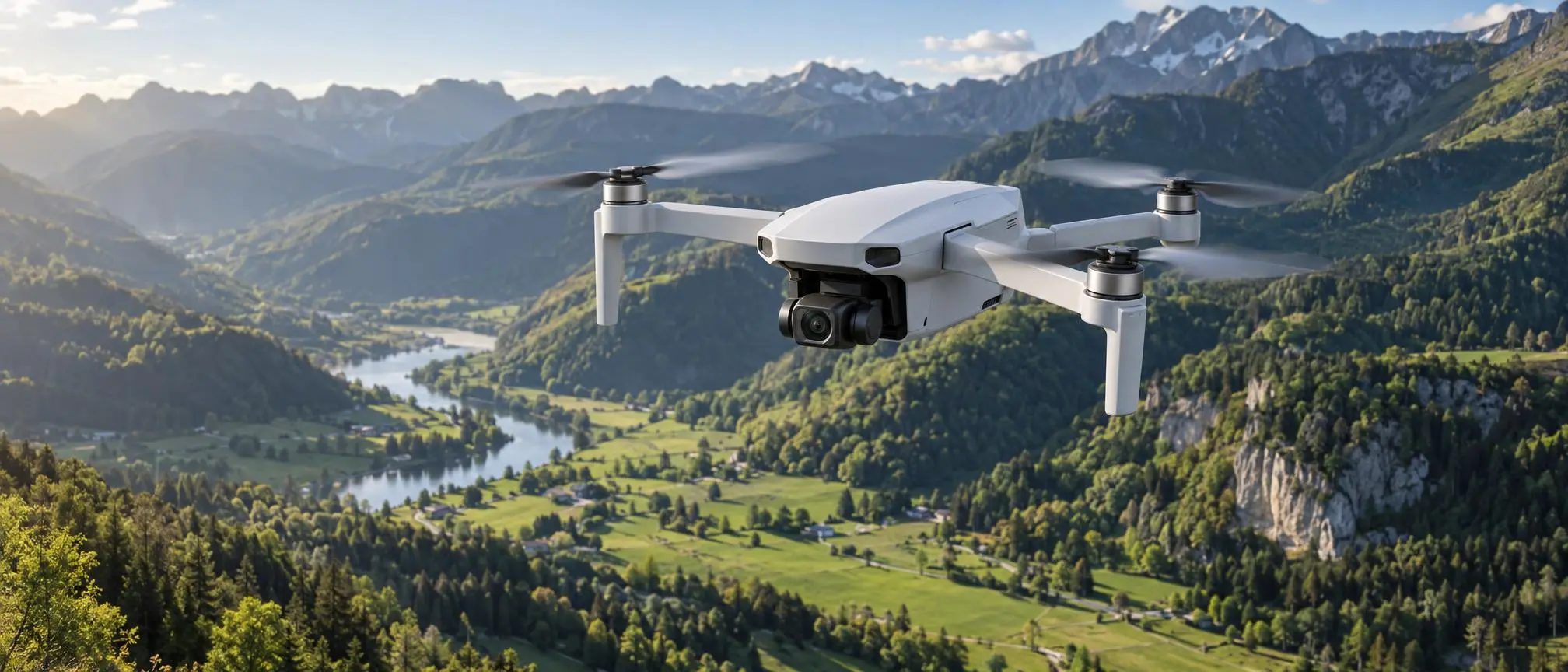

The ability to us Learning how to fly the Potensic Atom provides an entirely new view of the world around us.. Whether it is taking photos of the landscape in the country, or making smooth videos from above, smaller drones allow beginners to learn the basic principles of flying a drone and to produce quality images/video.
The Potensic Atom is a portable camera drone that folds up and can be carried around easily. The drone has a stabilized camera, GPS/GLONASS satellite positioning system, smart flight modes and can be controlled using your phone. This makes it perfect for recreational use as well as taking photos.
Before you take your first flight, it’s vital to know how the Potensic Atom operates. Knowing about its controls, camera settings, safety features and limitations will provide you with a more predictable and enjoyable flying experience.
The purpose of this guide is to explain some of the most important aspects of using a drone for the first time, including what drones can do, how to set up your drone, the basic techniques needed to fly your drone, and some general maintenance tips.
What Is Potensic Atom?
The Potensic Atom is a small-sized drone (quadcopter) that has 4 propellers, a built-in digital camera, sensor technology for navigation/positioning, and a rechargeable battery for power.
The weight of the standard configuration of this device is less than 249 grams (including the original battery, propellers and a memory card). Due to the collapsible nature of the device, it is easy to store and transport.
The Potensic Atom takes photos up to 12 MP and records videos up to 4K. It features a mechanical stabilizer to help reduce the effects of the drone moving when you take pictures/record.
Its position-tracking capabilities aid in sustaining a fixed-point hover, following a predetermined path (route) for flight and supporting the use of automated flight features.
The user will need to be aware of the weather, any applicable airspace restrictions, how much charge is remaining in their batteries, as well as what lies around them when flying.
Design and Portability
One noticeable feature of the Potensic Atom is its foldable structure.
The folded plane has dimensions of about 88 x 143 x 58 mm, which will allow it to be placed inside a small, convenient carrying bag.
The light weight of the body allows for easier transport while walking, participating in outdoor activities, or taking pictures.
Even though the size of the drone is small, it still requires proper care. The propellers, camera parts and other moving pieces may suffer damage due to improper use (such as crashing) or poor storage conditions.
When moving your Potensic Atom, provide sufficient protection for the camera gimbal and do not place large/heavy items directly onto the drone.
Before each flight, unfold both arms completely and check all propeller blades for any signs of physical harm.
Camera Features and Video Quality
The Potensic Atom has a camera that can record 4K resolution videos up to 30 fps.
High-resolution recordings are able to capture small visual details of scenes such as landscapes, buildings, and other outdoor settings.
The camera has the option to record at a lower resolution. This is beneficial for users who want smaller file sizes and/or various frame rate options.
With the Potensic Atom, you can make adjustments to your camera’s parameters like ISO, shutter speed, white balance, resolution, and frame rate, via its companion control app.
The above settings affect the way images appear in terms of exposure, how they look when moving, and their overall image uniformity.
Understanding 4K Recording
4K recording provides significantly more visual information (detail) than standard high definition video.
This may be useful for looking at video on big displays, or cutting off a portion of a photo in the editing process.
However, resolution alone does not determine image quality.
Final recording is affected by many other variables such as lighting, camera movement, exposure setting, and sensor capability.
Smooth flight and good natural lighting will provide you with better quality video when using the Potensic Atom.
How the Three-Axis Gimbal Works
The Potensic Atom has a three-axis mechanical gimbal that helps steady the camera.
A gimbal is a device with motors used to offset undesired motion on multiple directions.
The stabilization system will help maintain a consistent camera orientation when the aircraft is either tilted or changing directions.
The use of this can be most beneficial when taking video of scenery that is in motion and/or creating a smooth transition from one shot to another as well as aerial shots.
Therefore, the Potensic Atom will help eliminate a portion of the visual vibration that normally occurs during flight.
A gimbal will not prevent all of the sudden movements, severe vibrations, and strong disturbances that occur.
When a pilot is making a video recording, he/she should continue to make slow and steady control inputs, and avoid any unnecessary rapid maneuvers.
Photo Modes and Creative Photography
The Potensic Atom is capable of much more than just snapping photos.
The drone has a camera view which enables users to take photos of landforms, patterns, roadways, water bodies, and architectural structures from an aerial vantage point.
Under proper lighting, the 12-megapixel camera will allow you to capture a high level of detail in your photographs.
The Potensic Atom has support for interval shooting, which will allow you to capture a number of pictures with a specified amount of time in between each one.
The user can edit the pictures with editing software to produce a time lapse. Before taking pictures, you must think about what you want your subject to look like within the frame (composition) and the amount of light that hits the film/sensor (exposure). Also, before taking the picture, determine where the sun will be shining on your subject (sun’s position). Generally speaking, there is softer light during early morning hours and late afternoon hours than there is during the middle part of the day when the sun is at its highest point in the sky.
GPS and Satellite Positioning
The Potensic Atom uses Satellite Navigation Systems to identify its position relative to Earth when flying. The use of Satellite Navigation Systems allows the Potensic Atom to obtain positioning information from multiple GNSS (Global Navigation Satellite System) satellites.
Once a stable, reliable satellite position is identified, the Potensic Atom will then use this information to maintain flight control and stability during both hover and forward movement.
The Potensic Atom has a downward-facing sensor that can provide assistance with positioning when appropriate.
Performance of positioning systems may decline in areas with high-rise structures, dense forests, or other areas that block access to the satellite signal.
Verify that the airplane is in an appropriate position prior to utilizing automatic flight operations.
Intelligent Flight Modes Explained
The Potensic Atom offers automated camera movements designed to make some types of creative shots easier to achieve.
Modes: Pre-programmed movement sequences used by cameras for capturing images of subjects from multiple angles.
Examples include:
- Pull-away: Moves backward and upward while recording the selected subject.
- Rocket: Ascends vertically while keeping the camera directed toward the subject.
- Circle: Flies around a selected point.
- Spiral: Combines circular movement with changing distance or height.
- Boomerang: Follows a curved route around the subject.
The Potensic Atom has support for tracking subjects in most environments.
Automated flying is acceptable only within areas that are large enough and have legal permission for automated flight. There must be enough room around you to avoid hitting people, trees, buildings, etc., during the flight.
Tracking does not guarantee that the aircraft will detect or avoid hazards.
Battery Life and Flight Duration
The Potensic Atom has a stated upper limit of flight time of about 32 minutes, according to the manufacturer’s specifications.
The number given is based upon testing under very specific circumstances, and does not represent an actual flight time that you can expect.
The energy consumed by an aircraft is affected by wind, temperature, aircraft speed, data recording, and flight maneuvers.
The Potensic Atom uses its flight control system to display battery-related information to the pilot so that he/she can determine the amount of remaining power.
Make sure you have enough power in your battery before landing instead of waiting until the charge is very low.
Don’t expect that the longest stated flight time will occur for each flight.
Remote Controller and Video Transmission
The Potensic Atom uses a remote controller connected to a compatible smartphone.
The display on the phone shows the camera’s live view, flight information, settings for recording video, and what types of navigational controls are available.
The aircraft has a digital video transmission system with a manufacturer advertised maximum distance for operation at up to six kilometers under certain conditions, which often connects with modern cloud gadgets to enhance user experience.
This is a technical transmission standard, not an authorization to operate over this range.
The Potensic Atom must always fly within the constraints of all applicable aviation laws. These laws include but are not limited to, Visual Line of Sight (VLOS) rules.
Signal quality will deteriorate over time based on numerous factors including; electromagnetic interference, physical terrain (mountains etc.), manmade structures (buildings etc.), and various other atmospheric/environmental variables. A pilot must consistently monitor both their aircraft and the surrounding environment.
How to Set Up the Drone Before Flying
Preparing the Potensic Atom properly helps reduce common beginner mistakes.
Charge both the flight battery and the remote control as described in the official instructions.
Open the aircraft, extend the arms, then remove the protective cover from the gimbal prior to turning on the power.
Install the appropriate official control application for your compatible mobile device and then attach the mobile device to the controller.
The program used to control the Potensic Atom enables users to adjust camera options, monitor the status of the drone, identify which version of software the drone runs, and utilize every flight mode available with the drone.
Begin following the activation and pairing process as outlined by your specific version of firmware.
Ensure proper communication between aircraft and controller before taking off.
Essential Potensic Atom Pre-Flight Safety Checklist
Before launching the Potensic Atom, complete a basic inspection.
- Check that all propellers are secure and undamaged.
- Confirm the battery is sufficiently charged.
- Inspect the gimbal and remove its protective cover.
- Check the weather and wind conditions.
- Verify positioning and controller connection status.
- Confirm the flight location is legally accessible.
- Set a suitable return-to-home altitude for local obstacles.
- Ensure the takeoff area is clear of people and hazards.
Performing each check may assist in avoiding potential problems while you fly, and will give you a better overall view of your surroundings.
Learning Basic Flight Controls
Before beginning your first flight with the Potensic Atom, find an open area free of obstacles such as crowds of people, cars on the road, buildings, and overhead power lines.
Initiate the authorized flight sequence so that the drone will remain stable in place when it reaches an altitude of approximately 50 feet.
Spend time learning how each controller stick affects aircraft movement.
Practice gradual ascent/descent/forward/backward/left/right/rotation movements
Beginners should start out using slower, more controllable movement options when flying their Potensic Atom.
Before you are comfortable with flying your aircraft manually, do not try to fly at its maximum speed or use any of the aircraft’s automatic tracking features.
Short practice sessions will both build self-assurance and decrease physical exhaustion as well as the potential for unneeded harm.
Understanding Return-to-Home
The Potensic Atom has a return-to-home feature. It flies back to its home location automatically when needed. This is useful during a signal loss or low battery.
This feature may come in handy when a pilot needs to turn around in flight, or if he/she experiences problems connecting to the internet or with the aircraft’s battery.
Before takeoff, confirm that the correct home point has been recorded.
Set a safe return altitude before takeoff. This helps your drone avoid trees, buildings, and local airspace obstacles.
Return-to-home is not a substitute for actively controlling the aircraft.
Hazards can still exist because of errors in position, obstacles, changes in condition and/or a short battery life.
Flying in Different Weather Conditions
Weather has a major influence on drone safety.
The Potensic Atom features Level 5 wind resistance. However, flying in strong gusts is still risky.
Aircraft stability, and therefore the amount of power consumed from the battery pack, may be affected by the direction of wind, by turbulence, or by sudden changes in wind speed (gusts).
Beginners should practice in calm, dry conditions with good visibility.
Do not fly during rain, thunderstorms, or beyond the manufacturer’s recommended operational parameters for the aircraft.
If it appears to you that the airplane is becoming difficult to control, then you must land as soon as possible, as opposed to continuing your flight.
Drone Rules and Responsible Flying in the United States
Recreational pilots in the U.S. typically need to pass the free Recreational UAS Safety Test, and have proof that they passed it.
A drone weighing less than 250 grams may be eligible for a registration waiver if it is only operated within the recreational use guidelines, and as long as the weight at the time of take off does not exceed the limit.
Commercial or other non-recreational operations have different requirements.
Pilots are required to abide by airspace regulations, get approval when necessary, stay within the pilot’s visual range of the aircraft, and give priority to other manned aircraft.
Before taking off with your lightweight drone always verify the latest official regulations. A lightweight drone doesn’t necessarily qualify for exemption from aviation safety regulations.
Tips for Better Aerial Videos
Recording footage with the Potensic Atom requires careful planning. This planning is often more important than using complex camera movements.
Begin with a clear subject and decide what viewers should notice in the scene.
Use slow, steady flight movements and maintain a consistent camera direction.
Avoid frequent changes in speed or unnecessary rotations during a single shot.
The Potensic Atom has the ability to take shots of higher-up landscapes, slowly reveal a shot, and create smooth tracking sequences.
You can make multiple shorter videos rather than making a very long video that is unnecessary.
Review the results at a later date to determine what types of motion create the best-looking and most functional images.
Potensic Atom Maintenance and Storage
Regular care helps keep the Potensic Atom in suitable operating condition.
After every flight, check your propeller for damage from hitting things like plants or other items.
Do not damage the camera or sensor while using proper cleaning materials to clean accessible areas and eliminate dust.
Keep the gimbal protected during transportation.
Keep aircraft and battery storage between 50 and 100 degrees Fahrenheit.
Avoid leaving batteries in direct sunlight or a hot vehicle.
Please follow the manufacturer’s recommendations for storing and charging the batteries, especially if you intend to leave your drone unused for an extended period.
Common Problems and Basic Troubleshooting
Sometimes users of the Potensic Atom can encounter problems with their connection, position, charging and/or ready-to-fly.
Verify the charge of your controller’s battery. Ensure you have a functioning cable to connect your phone or tablet. Confirm the application runs correctly, and complete all pairing steps if connection fails.
Move to a position in the outdoors, in an open area with a better view of the sky to assist in resolving positional difficulties.
If you are experiencing shaking in your video, please check to see if the propellers are damaged in anyway. Also, ensure that the camera mount moves freely without any limitations.
Do not attempt flight when a critical warning remains unresolved.
When a problem is unresolved, please follow the company’s established problem solving procedures rather than attempting to continue to fly un-safely.
Frequently Asked Questions
Is Potensic Atom suitable for beginners?
Potensic Atom has some safety features for those who are just beginning to fly such as position-keeping system, multi-level speed controls and auto-flight capabilities. However, beginners must be educated about safe operation of drones, and the relevant rules in their area.
Can Potensic Atom record 4K video?
Yes. Based on the published specifications, the Potensic Atom is capable of recording video at a maximum resolution of 4K and 30 frames per second.
Does the drone have GPS?
Yes, the system is designed to use multiple satellite navigation systems for location-based services (LBS) and for supporting various navigation functions.
How long can the drone fly?
The advertised maximum flying time is about 32 minutes when tested according to certain specifications. However, actual times may vary depending on how the aircraft is operated and what condition it is flown in.
Can the drone automatically go back to where it was launched from?
Yes, the drone has the capability to go back to the launch point if possible. To use this option, pilots must identify their home point and establish a safe flight altitude for returning safely.
Is it possible to use the drone in high wind conditions?
An aircraft’s wind tolerance depends on many factors. However, new pilots should fly only on calm, sunny days and avoid bad weather.
Do I have to register my lightweight drone?
Requirements depend on the country, the weight of the aircraft at takeoff, and why you are flying. If you are flying in the United States, there may be an exemption from registering your aircraft if it is a recreational flight and weighs less than 250 grams. However, there will still be regulations that you must follow.
Conclusion
The Potensic Atom is a very small, lightweight camera drone with many high-tech features including being able to take still images and video while in flight; using GPS/satellite navigation to help guide the drone; and having advanced flight control systems.
Mastering the drone’s built-in cameras, battery limits, and basic flight principles is essential. Understanding these operational risks prepares you to capture exceptional aerial photography.
It is recommended for beginner drone operators to learn the basics first (hovering, flying smoothly, checking the condition of the drone before each flight), before attempting more complicated maneuvers.
If you are a responsible drone operator who takes care of their drone, you will be able to find a cost-effective way to get started taking pictures from above and exploring new perspectives on the natural world.