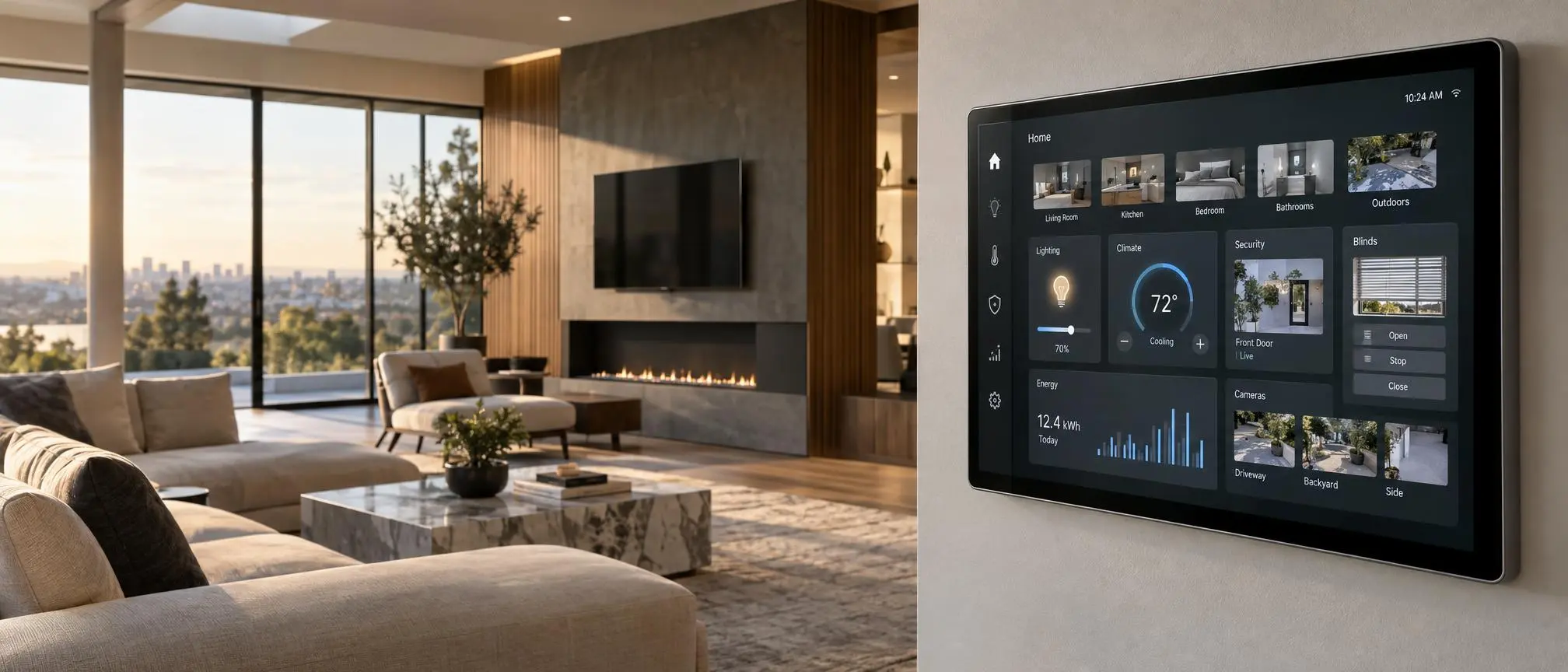

After a long day, when you arrive back at your house, imagine being able to adjust the lighting, view what’s happening outside via your security cameras, and set the ideal temperature for your home, all with one simple app instead of multiple ones. This is the convenience that comes with using a smart home control panel as part of your daily routine.
As more and more households become “smart,” it may seem that managing all of those connected gadgets is becoming increasingly complex. Fortunately, a Smart Home Control Panel simplifies the process of controlling many devices from a single point.
This guide can help you understand what types of products exist, their most significant characteristics, their compatibility requirements, and the practical steps to installing those products, regardless of whether you’re converting your current house to a “smart” environment or building a brand new one.
What Is a Smart Home Control Panel?
Smart home control panels provide a centralized interface. Users can access and control all smart home devices from one screen or dashboard.
You can use the panel to adjust lights, set temperatures, control smart outlets, view security camera footage, operate curtains, and automate daily tasks.
A smart home control panel offers easy-to-use access to all of your essential features from one single, unified screen as opposed to having to switch back and forth from multiple apps.
For instance, residents can place a single display near the front door. This lets them deactivate ground floor lights, set the temperature, and start their night-time routine easily.
Systems can also provide weather reports, energy usage data, and alerts based on information received from devices that are connected to them.
The features of a smart home control panel are determined by the software that is used, the compatible devices, and the hub/smart home platform that is being utilized.
How Does a Smart Home Control Panel Work?
A smart home control panel can be used to communicate with all of the different devices that are connected to it via a compatible smart home ecosystem.
When a user presses a key on the screen, a signal will be sent to the proper device. Depending on how your home is configured, signals can pass directly over your local network, via a smart home controller (or hub) or through an internet-based service.
For example, you can choose a sleep schedule. This action dims your bedroom lights, lowers your thermostat temperature, and turns off compatible smart outlets.
With a smart home control panel, users will be able to perform all of these tasks through one central location.
Understanding Wireless Connectivity
Most smart home systems use one or more communication technologies:
Wi-Fi: Commonly connects displays, cameras, and other devices to a home network.
Zigbee: An energy efficient wireless technology often utilized in sensors, switches, and lights.
Z-Wave is a second option for low-power networks that are compatible with home automation devices.
Thread: A mesh networking technology used by certain smart home devices.
Matter: An interoperability standard for supporting products that are compatible with each other in an ecosystem.
Matter supports many devices. However, this does not mean all devices work together.
Differences depend on hardware capabilities, feature support, and the controlling platform.
Benefits of Using a Smart Home Control Panel
The smart home control panel will make every day easier to manage, particularly for families that have multiple connected devices.
Convenient Centralized Control
One of the biggest benefits is having essential controls in a single location.
A smart home control panel lets family members access everyday functions directly. This eliminates the need to remember multiple app names and passwords.
This is especially helpful for shared areas like living rooms, kitchen and entryways.
Easier Daily Automation
Connected devices become more useful when they work together.
For example, a morning routine can gradually turn on your compatible light bulbs. It also sets your thermostat and opens your motorized window coverings.
These routines are usually initiated from a screen, but can also be run using an automated system.
Improved Household Accessibility
Not everyone wants to use a smartphone for basic tasks.
The use of large, easy to read buttons can be helpful for children, older adults, and guests when they want to adjust the light or temperature of a room.
Confusion is reduced when the design of an interface displays only those controls that users will typically use.
Better Visibility of Connected Devices
Your smart home control panel shows active lights, locked doors, and temperature sensor readings.
This over-view will help you to recognize devices that you may have lost track of and provide an understanding of the events taking place in your home.
Potential Energy Management
Some platforms provide electricity usage information and scheduling options.
Reducing excess energy use may be achieved through automated lighting, control of occupancy based upon sensors, and reasonable scheduling of thermostats.
However, savings are based on your family’s daily routine, how well your equipment runs, and the way you set up your system.
Different Types of Smart Home Control Panel
Choosing a smart home control panel starts by understanding the various types of hardware and software used in today’s market.
Wall-Mounted Touchscreen Panels
Wall-mounted smart home control panels offer a permanent control point in a central home area.
These displays match room interiors and provide easy access.
Some units require professional wiring. Others use an external power adapter or receive power via an Ethernet cable (PoE).
Homeowners who plan on having a long-term installation will find wall mounted installations to be ideal.
Tablet-Based Control Dashboards
A tablet based smart home control panel utilizes a compatible tablet with a home automation app installed.
This method is attractive to individuals who currently have appropriate computer equipment and desire more options with regard to the interface.
For instance, a Home Assistant dashboard on a tablet can show room controls, weather data, and home automation scenes.
However, permanent installation of tablets will need to be maintained through maintenance of their charging, battery life, how they are mounted, cooling of the device, and when it is updated.
Smart Displays With Voice Assistants
Users can choose between touch screens and voice commands. Some panels offer both options.
This combination works well in kitchens and shared family areas where hands-free appliance control is needed.
Controls available will differ from product to product and with different systems. You should always determine if your display is compatible with the items that you have purchased.
DIY Home Automation Panels
For people who have some familiarity with making changes to their computer systems, a DIY smart home control panel will allow them to customize their system even further.
Users can group all their connected devices together in a single dashboard using platforms like Home Assistant.
Separate views could be created to monitor lighting, home security, temperature controls, and energy consumption.
Trade-offs include the amount of time needed to set up, troubleshoot, maintain and sometimes change software.
Essential Features to Look For
The experience provided by each of the different types of smart home controls can vary. Therefore, before you purchase a smart home control system, take into account what capabilities would enhance the day-to-day operations of your home.
Device Compatibility
Verify if the panel is compatible with your chosen smart home system and current equipment.
Compatibility is more important than an impressive-looking display.
Screen Quality and Size
A user-friendly touchscreen that allows for easy reading, has wide viewing angles and is responsive will make your daily interactions simpler.
For individual rooms, smaller screens will likely suffice. However, larger screens allow you to see more camera views, more scene options, and more categories of devices at once.
Automation and Scheduling
The best smart home control panels will give you quick and easy access to your most frequently used routines.
The underlying platform offers features such as scheduling, scene control, and automation.
Local Control Capabilities
Some systems continue performing certain actions during an internet outage.
However, this depends on device protocols, the controller and if you need to use cloud services.
The local operation of a system can be very beneficial for frequently used functions such as basic lighting.
Software Updates and Support
Smart home controls must be provided with reliable software and security updates by the device’s manufacturer, or by the platform provider.
Prior to purchasing, research updates policy, warranty terms, support materials and alternatives for replacement.
If the software that runs on an attractive screen stops being supported quickly, then the screen is of little value.
Smart Home Control Panel Compatibility Explained
A smart home control panel is only as useful as the devices it can operate. To better understand the core differences between centralized systems, you can read this guide on Smart Home vs Home Automation.
Displays developed for use within a specific ecosystem differ from those developed to integrate into multiple ecosystems via an automation hub.
Common platforms include:
Amazon Alexa: Beneficial for households that use compatible Alexa devices, routines, and supported smart home integrations.
Google Home: Allows users to control compatible connected devices that are part of Google’s smart home system.
Apple Home: Offers a seamless experience with all supported devices, but you will need to meet Apple’s platform and hardware specifications.
Samsung SmartThings has support for many different types of compatible smart devices, as well as a variety of automated processes.
Home Assistant: Provides great customization options and integration capabilities for users that want an adjustable home automation system.
First, make a list of all your current lights, locks, sensors, cameras and thermostats before choosing a smart home control panel.
Then ensure you can control all of the devices and access their essential functions.
A camera added to an existing ecosystem doesn’t guarantee that the live video feed will appear on each of the available control screens.
How to Choose the Right Smart Home Control Panel
What works best for your family’s daily routine determines the right smart home control panel for you, not the marketing hype surrounding each product.
Start by identifying what you want to control.
If you primarily want to control your home’s lighting, a smaller touch screen with basic lighting controls will likely suffice.
If you are running a larger household that includes cameras, thermostats, window treatments, and numerous other areas in your home, you will most likely find that having access to a more extensive dashboard is beneficial.
Consider the following factors:
Your existing infrastructure: Choosing hardware that works with your current systems will help you avoid spending extra money on new equipment.
Installation Area: The area where you intend to install your item should be easily accessible but out of the way of your daily activities.
Required power: Verify if there is a requirement for a wall outlet, appropriate electrical wiring, or Ethernet connectivity.
Usability: Large buttons, clear labels, and logical menu structure will be more usable than complex control panels.
Long Term Support: Buy products with good documentation, and a reasonable software maintenance policy.
Total Budget: Remember that you must account for all the other components needed for a full installation, such as; mounting hardware, hub, wiring and professional installation.
The best smart home control panels will help you manage your connected home with less effort rather than more.
Smart Home Control Panel Installation Guide
The process of installing your smart home control panel will either be very easy or quite involved based upon the way it receives electricity and how you want to mount it.
Step 1: Choose the Location
The location of the device should be in a place where all family members will find it easy to use and see the screen.
Keep away from extreme temperatures, bright light, and places that will likely get wet.
Step 2: Check Power and Network Requirements
Confirm that suitable power and connectivity are available.
You may need a certified electrician for hardwired installations. Never assume an existing wall switch box contains all electrical connections needed for a new touchscreen.
Step 3: Connect the Software Platform
After connecting your panel with the manufacturer’s suggested home automation system, make sure you follow all of the manufacturer’s directions for making that connection.
Install required updates before configuring sensitive devices.
Step 4: Add Devices and Rooms
Organize compatible equipment by location.
In addition to grouping items like living room lights, bedroom heat and outside cameras into well-defined groups.
Step 5: Create Useful Routines
A smart home control panel can be much easier to use if there are simple shortcuts to take for frequently used functions.
Creating different types of “scenes” for your home such as morning, evening, away from home, and movie night scenes will allow you to create customized settings based upon how you live your life.
Step 6: Test the System
Confirm that controls respond correctly and authorized users can operate them.
You should test the accessibility of key physical controls when the internet connection is lost.
Security and Privacy Considerations
You can use a smart home control panel to manage many aspects of your home, such as locking doors and controlling security cameras.
Therefore, safety is just as important to focus on as looks and easy access.
Keep your account passwords strong, use multi-factor authentication whenever possible, and keep all of your connected devices updated.
You should implement proper user authorization to restrict who can alter sensitive configuration options.
Avoid displaying excessive personal data if visitors have access to your screen.
Your smart home control panel connects to cameras or door locks, so it must also offer easy-to-understand authorization options.
Review the way the platform stores data and if the ability to connect remotely relies upon third-party cloud-based service providers.
Common Mistakes to Avoid
People may choose a smart home control panel simply because of how it looks.
An attractive display can be useless, however, if it isn’t able to control significant equipment.
In addition to those, there are other errors commonly made by users when selecting a screen. These include picking a screen that’s hard to view, ignoring the electrical requirements of the product, thinking that each and every Matter device provides the same capabilities, and making a permanent installation of a display without taking into consideration how easy it will be to maintain it in the future.
Another mistake is creating too many controls on the main screen.
Oftentimes, a simple dashboard of the most commonly used features can be more beneficial to users than a complex and cluttered dashboard with many less frequently utilized options.
Frequently Asked Questions
What is the main purpose of a smart home control panel?
A smart home control panel primarily gives users an easy way to interact with all compatible connected devices. This simplifies daily tasks because you can manage lighting, heating, security, and other functions from one place.
Can I use a tablet instead of a dedicated control panel?
Yes, a compatible tablet will be able to show you your home automation dashboard. In order to permanently use it, you will need to find a way to properly mount it, safely manage the power of the device, and regularly update the software on the device.
Does a smart home control panel work without the internet?
Some functions will still operate locally on a device, depending upon the type of hardware and the manner in which the user has configured the devices. Cloud-based controls and remote services could cease to function when there is an outage.
Is professional installation necessary?
Sometimes. Displays that are plugged in or used on tablets are typically easier to set up. Hard-wired electrical panels usually require installation by an authorized electrician.
Can one panel control different smart home brands?
In general, yes. The potential exists for a “compatible” ecosystem/home automation hub to support products from many different companies. Prior to making a purchase, always verify that your specific product(s) are supported by the compatible ecosystem/hub.
Is a dedicated panel better than smartphone control?
Both options are not better than each other. For example, a dedicated screen will allow multiple people to use it within your home. On the other hand, if you want to be able to control your system from outside of your house, then using a smartphone would be the way to go.
Final Thoughts
A Smart Home Control Panel Will Enhance Connected Living Organization, Accessibility and Enjoyment.
The most critical part of this process is selecting a solution that is reliable with all of your existing devices, as well as being compatible with how you run your home.
: Compatibility, function, installation requirements, usability and ongoing software support are the key factors when selecting an app to control multiple smart devices. Planning your system carefully can help you create a control interface that makes using several different smart devices more efficient and easier to use in everyday life.