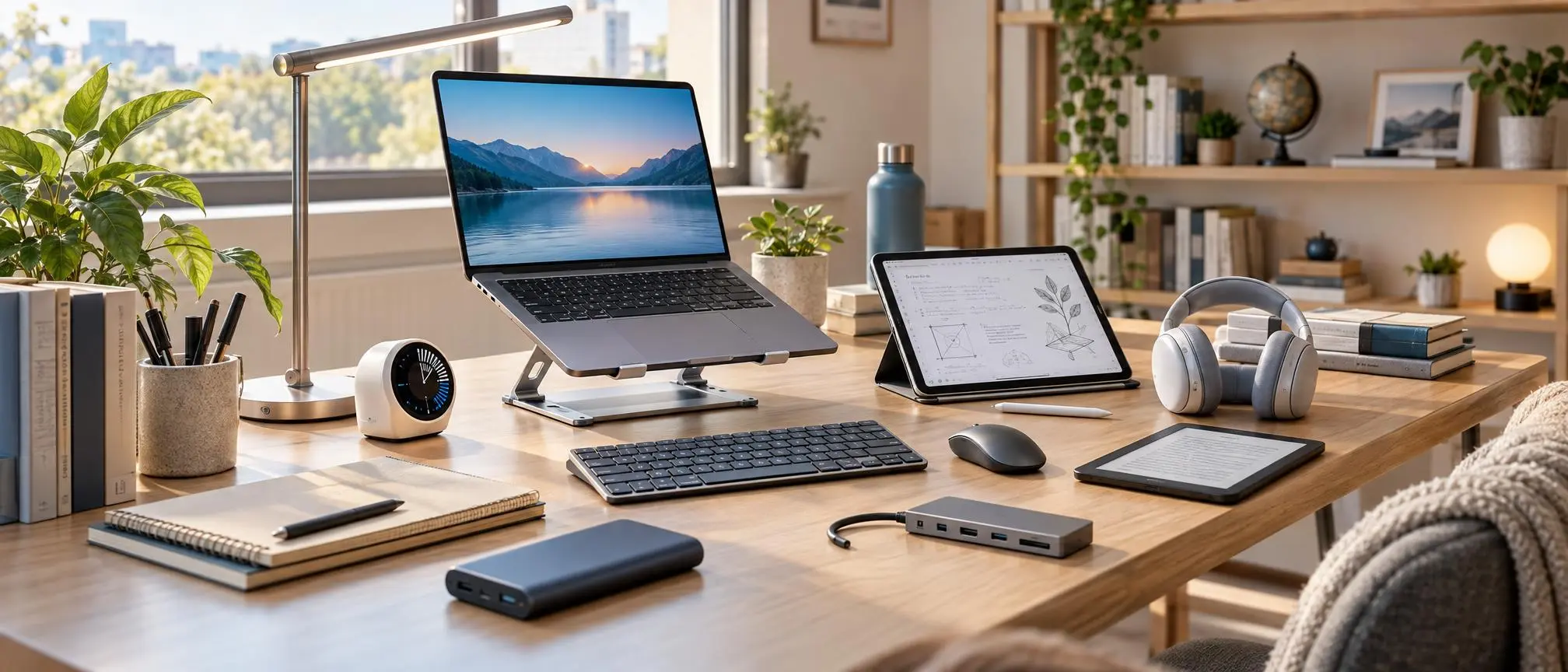

Studying can be hard sometimes. There are many things that pull your attention away. Loud rooms, constant phone alerts, tough homework and deadlines all make it tough to stay focused.. Technology offers tools that can help make studying easier and more organized.
Students today are turning to gadgets to support their learning. These tools help them stay on track and improve how they study. There are kinds of tech items available—like digital notebooks, noise cancelling headphones and more. These help students deal with the struggles they face in school.
You don’t need to spend a lot of money to find study gadgets. Many affordable options do the job as more expensive high-tech devices. It’s about finding what works for you not what looks fancy.
This guide shares 12 gadgets for students. It explains how each one can help and what you should consider when setting up your study space.
What Are Gadgets Study ?
A study gadget is any device or tech accessory that helps students with their studies. These tools support learning, focusing, note-taking, staying organized and being more productive.
The study area might include a laptop, a tablet, a digital clock, an adjustable light or a wireless headset. Each item has its role.
For example a tablet lets students write notes directly on the screen. Headphones help block out background noise so students can concentrate better.
The main goal of using study gadgets is not to replace study habits. It’s to solve problems that come up when studying. These tools make the process smoother and more effective.
The best approach is to pick gadgets based on your needs. Don’t just buy trendy items. Choose what fits your study routine and helps you stay focused.
Noise-Canceling Headphones
Students can use noise-canceling headphones when they need to study in active environments like a busy home, library, dorm room, or apartment with others.
These headphones employ an advanced sound cancellation system designed to diminish environmental noise, specifically continuous ambient sound.
Headphones will assist in listening to prerecorded lectures and focusing in noisy environments.
Some students prefer instrumental music, while others work better in silence.
When selecting headphones, you should take into account their comfort level, how long they will last before needing a charge, how good they sound, and how effectively they block out outside noise.
A proper gadget use study routine includes maintaining an appropriate listening volume and taking rest breaks periodically.
The use of noise cancellation will not eliminate all of the sounds in an environment, however; it can help create environments that are more conducive to learning.
Digital Note-Taking Tablet
A digital tablet with a stylus would be beneficial for students who consistently write by hand.
Students may choose to create digital folders for each of their subjects rather than carry multiple notebooks.
A gadget-based study tablet could allow you to write by hand, make notes on PDFs, draw diagrams, share documents with others, and take part in virtual classes.
The advantage of using this type of method is that it is especially effective when teaching subjects that require students to use their knowledge of math, science, and/or visual aids.
Students may also search their notes using other compatible applications and view their materials from different devices.
Before buying a study tablet, make sure to consider if your stylus will work with it, how long the battery lasts, how much storage is available, and what apps are available for taking notes.
If you primarily use simple written notes in your course, then a standard notebook may be fine for you.
Adjustable LED Desk Lamp
Adequate lighting is vital to creating a comfortable studying area, particularly when reading at night.
Adjustable LED Desk Lamps allow students to direct light at their textbooks, notebooks, and work space.
The practical gadget’s study desk lamp needs to be bright enough to use but not shine into the users eyes.
Models which allow the user to adjust the level of light emitted from the model and how it is positioned will give users more options for their various uses.
In general, you may find that brighter lights are useful for reading printed materials, but softer lights are more appropriate for working on a computer screen.
A properly positioned device study lamp will reduce distracting shadows, as well as un-wanted glare.
Choose a stable lamp that fits your available desk space.
Smart Digital Notebook
Smart notebooks combine traditional writing with certain digital features.
Students can scan hand-written pages, store notes on a computer or other electronic device, or use specialized writing surfaces, based on which model they are using.
Students that prefer to write with a pen/pencil, yet would like a digital copy of their notes may find a gadget study notebook useful.
It may also reduce the need to carry several paper notebooks.
However, features vary significantly between products.
Some notebooks will need a certain type of pen, specific types of paper, or a mobile phone app.
Prior to purchasing a gadgets study notebook, verify if the scanning and storage functionalities will actually align with your study habit.
A regular notebook and a free scanning app might be an affordable alternative.
Portable Laptop Stand
Students frequently use laptops for numerous hours per day to attend virtual lectures, complete schoolwork, and find facts about various topics.
A laptop stand can raise your screen to a better viewing height and possibly make your work area more comfortable.
The inclusion of a stand as part of your study setup with electronic devices may prove beneficial if you plan on spending long periods of time sitting and working from a desk.
Many models fold for transportation and fit easily into backpacks.
As a result, as well as being difficult to type on, raising a laptop computer can reduce the comfort of using the computer’s keyboard.
When you are studying on your gadget, make sure to use an adequately high laptop with an external keyboard and mouse for an improved workspace.
Before you purchase a product, make sure that it is stable, adjustable for height, compatible with other products, and easy to carry around.
Digital Study Timer
When you can receive a notification at any moment, managing your study schedule becomes very difficult.
A digital timer provides a simple way to organize focused work sessions.
Most students use the Pomodoro technique. It usually consists of 25 minutes of working on something and then taking a break.
A student’s daily routine can be assisted by a gadgets study timer without having to look at their phone.
The optimal amount of time spent per session depends on both the type of task and the individual’s preferences.
For demanding assignments, longer uninterrupted periods may work better.
A gadgets study timer can be a cost-effective method for creating more structure within your study session.
The timer itself does not guarantee productivity; consistent habits matter more.
Portable Power Bank
Students that spend extended periods of time at school and/or frequently take trips find a portable battery pack (power bank) especially useful.
This device provides mobile power for applicable smart phones, tablet computers, and select laptop models.
A high-quality study power bank can prevent unplanned battery issues while you are attending lectures or revising.
Students must take into account battery size/capacity, fast-charging ability, safety precautions (overcharging), and device compatibility.
Remember that not every power bank can charge a laptop.
For a productive study accessory with a functional device, pick a brand that is well-known and supports USB-C Power Delivery when needed.
Avoid damaged batteries and follow the manufacturer’s charging instructions.
E-Reader for Digital Textbooks
E-readers are designed primarily for reading digital documents and books.
Many people have used E Ink displays, they are similar to paper and are used instead of traditional tablet screens.
E-readers provide an excellent way for students to use their electronic devices for studying because they allow access to textbooks, reference books, and other required reading.
Some models allow highlighting, annotations, and dictionary lookups.
Battery life is often another advantage, although actual performance varies.
When students consider purchasing a gadget-based e-reader for studying, they need to verify which types of files are supported by the device, as well as how well the device is able to display diagrams and PDF documents.
For those textbooks with numerous full-color illustrations, a laptop or tablet would probably be better.
Wireless Keyboard and Mouse
Using a wireless keyboard and mouse while studying with your laptop will provide greater comfort than if you were to use only the on-board keyboard and trackpad. This is true especially when you have an additional screen (monitor) connected to your laptop, or you are using a stand for your laptop.
These accessories give students greater flexibility when arranging their desks.
The ideal gadgets research keyboard would feature comfortable keys, provide reliable connection, and have enough power to last.
A mouse can also aid in editing your document, spreadsheet or presentation.
Compact models work well for students who regularly change study locations.
When you update your gadget study workspace, remember to buy good quality basic accessories, which are usually better than adding unneeded extra-cost features.
USB-C Hub or Multiport Adapter
Modern laptops sometimes have limited connection ports.
A USB-C hub allows you to connect more things to your compatible device such as; USB accessories, an external monitor or display, and additional hard drive space.
The Gadget Study Accessory can be beneficial to students that have numerous peripheral devices.
A hub will enable a student to utilize three devices at once: an external keyboard, an external display (monitor), and a USB device (drive).
Features vary depending upon model; also, some hub types may be restricted in regard to their ability to provide display output, and/or their ability to charge devices.
Prior to purchasing a gadget study usb-c hub, please ensure that it is compatible with your laptop’s physical port capability.
Choosing the right adapter can help avoid unnecessary connection problems.
External SSD for File Storage
Assignments, presentations, research papers, and media projects may require a lot of storage.
Solid-state drives (SSDs) are externally connected and can be used to provide additional storage on most types of computer systems.
Adding an SSD to your learning tools can help you complete big academic assignments.
SSDs generally offer fast access to files and have no moving mechanical parts.
However, an external drive should not be your only backup destination.
A safe and effective strategy for storing studies on your device should include making several copies of all critical files and placing at least one of those copies in another location (e.g., in a different place than the original) or utilizing a reliable cloud-based storage system.
Prior to buying, assess capacity, transfer speed, longevity and compatibility.
Digital Voice Recorder
When it’s okay to make a recording, a voice recorder can be used to write down what people are saying.
Students can utilize one of these devices for interviews, foreign language training, self-study, or sanctioned presentations.
Within a gadget study system, recordings may be used to supplement written notes, and enable students to go back over complex explanations.
There are some devices today that will allow you to transcribe audio, however, the level of accuracy is dependent upon both the quality of the audio being recorded and the language used in the recording.
You should always have proper authorization prior to making recordings of your teacher(s), classmates, or anyone else.
When selecting a gadgets study voice recorder you should take into consideration the quality of the microphone, how much data can be stored on the device, the amount of time the device has to operate before needing to be recharged, and whether there are options available to protect your files from unauthorized access.
Recording is most useful when paired with active listening and later review.
How to Choose the Best Study Gadgets
The most useful tool to help you with your studying is the one that solves a problem you have with your study habits.
Before creating a gadgets study shopping list, identify what slows you down.
- Is background noise a problem for you?
- Do you find it hard to keep your notes organized?
- Is your laptop constantly low on power?
Begin by fixing your most critical problem before you purchase a number of different items.
Consider these factors:
Budget: Decide how much you can reasonably spend.
Compatibility: Check whether accessories work with your existing devices.
Portability: Choose lightweight equipment if you study in multiple locations.
Durability: Look for reliable construction and suitable warranties.
Practicality: Prioritize features you will actually use.
A great way to create a gadget-friendly study area doesn’t require a lot of money. You’ll likely find that a small desk lamp, a kitchen timer, and a good quality laptop can give you all the tools necessary for studying.
Common Mistakes Students Should Avoid
Buying technology without understanding its purpose can waste money.
Students often buy fashionable items for their wardrobe that offer very little useful function.
Many students who study electronics believe that they will get higher grades if they buy expensive electronic equipment.
There is also the risk of having too many productivity apps installed. This can result in additional distractions.
Avoid buying devices solely because influencers recommend them.
Instead, evaluate your current tools, create a regular study plan, and recognize true limitations.
A balanced approach to studying using electronic devices is a combination of utilizing technology effectively for study purposes, practicing active recall, taking practice tests/questions, making scheduled breaks, and managing your time efficiently.
Frequently Asked Questions (FAQs)
What are the best study gadgets for students?
There are many useful studying devices that you can use. Some examples include noise-cancelling headphones, tablet computers for taking notes, digital timers, desk lamps, laptop stands, and portable chargers. You should select the one that will help meet your individual studying requirements.
Can study gadgets improve concentration?
Some devices used as accessories to help with studying can be helpful for maintaining focus, either through decreasing interruptions or organizing a student’s workspace. However, it is also essential to have good studying techniques and an appropriate studying space.
Which study gadgets are affordable?
Affordable products can range from electronic timers, to simple LED light fixtures, to computer stands, to wireless mice, to various types of USB peripherals. Prices are dependent on the manufacturer and the product’s capabilities.
Are tablets better than traditional notebooks?
Digital organization and annotation capabilities are provided by tablets, whereas traditional notebooks tend to be more affordable and don’t need to be charged. Either may work for you depending upon what you prefer.
Are study gadgets necessary for academic success?
No, a gadget study space can help you learn, however, you do not need gadgets to get good grades. What is most important is that you understand what is being taught in your classes, revise regularly, and find effective ways to study.
How can students avoid distractions from technology?
Turn off unwanted notifications, set aside time for studying, close entertainment apps and schedule your break times. You can also use a different timer to help you limit how much you look at your phone.
Conclusion
Using technology to study will help you with convenience when studying. To choose the best type of technology for your use, you need to understand what you require.
Organizing notes, creating a comfortable work area, managing study time and making daily school related activities easier are some of the ways that a well thought out gadget study setup can make things easier for students.
Whether you purchase headphones, a digital notebook, an e-reader or simply a plain old desk lamp, think about what is most useful rather than how it looks.
Above all else, don’t forget that no device will substitute for real hard work and continued practice.
Gadgets used for education support improved learning practices and are not intended to create dependencies upon costly equipment.
Begin with several of the most useful practical tools, assess how well they work for you, then create a learning space that is best suited to your needs.