
Introduction
The use of MDMS (Mobile Device Management System) is now essential to modern business. Employees rely on their smartphones, tablets, laptops, etc., to communicate with each other, access business-related information, and complete work-related tasks remotely.
The process of controlling many devices (hundreds to thousands) will be difficult if there isn’t an appropriate system for doing so. Business organizations require a dependable method of tracking their devices, safeguarding confidential data, and meeting their compliance requirements for security.
This is where MDMS becomes important.
This system is a centralized software system used by businesses to administer, secure and track mobile devices used by employees. It provides administrators with the ability to manage device configuration, implement security policy, download and update applications on the devices, as well as protect proprietary business data.
Remote working, along with the growth of digital technology as a whole, is causing the system to be a must-have for those companies who have employees using some form of device connected to the internet.
What Is MDMS?
This system is a software program that allows organizations to administer and protect all of their mobile devices.
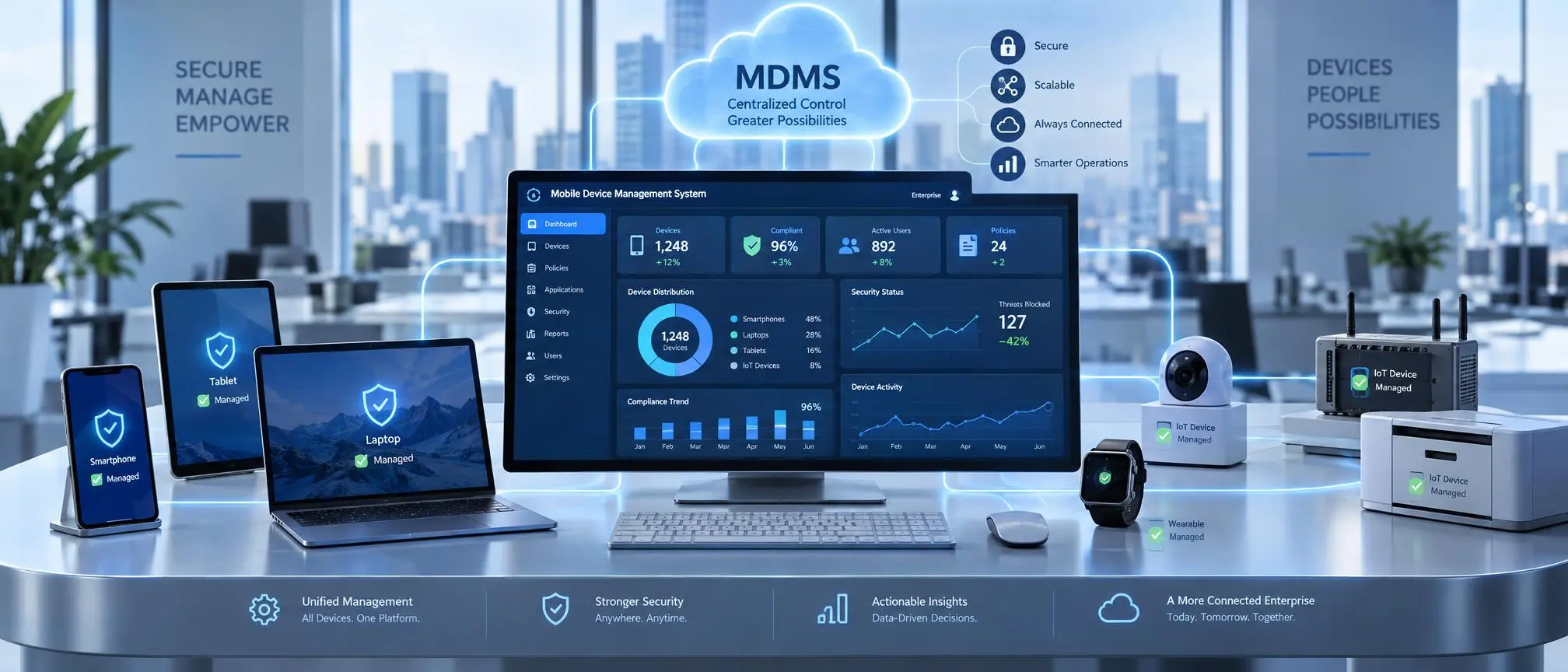
This system allows IT teams to remotely control devices such as:
- Smartphones
- Tablets
- Laptops
- Rugged business devices
- IoT-connected devices
Rather than individually set up each of your devices, you as an administrator will be able to control every device using only one central dashboard.
The core objective of an the system is to increase efficiency, provide greater security, and reduce the complexity of managing devices.
How Does MDMS Work?
The way this system operates is through the connection of each mobile device to a single management platform.
The process usually includes three main components:
Management Server
The management server acts as the control center of the system.
It allows administrators to:
- Add devices
- Monitor activity
- Apply security rules
- Manage applications
- Generate reports
Device Agent
The device agent is installed on smartphones, tablets, or computers.
It allows communication between the device and the this system server.
Through the remote management of these devices and their associated security policies, administrators can remotely control the device configuration.
Administrator Dashboard
The simple user interface on the dashboard allows IT teams to see and manage their connected devices.
Administrators can check:
- Device status
- Security alerts
- Installed applications
- User activity
Key Features of MDMS
Organizations use a modern MDMS with numerous powerful functions for effective device management.
Device Monitoring and Management
One of the primary functions of MDMS is device monitoring.
Organizations can track:
- Device health
- Operating system versions
- Security status
- Device usage
This helps IT teams maintain better control over company devices.
Remote Configuration
Setting up hundreds of devices manually requires significant time.
With this system, administrators can remotely configure devices by applying:
- Wi-Fi settings
- Email configurations
- Security policies
- Application settings
This makes device deployment faster and easier.
Security Management
Security is one of the biggest reasons companies implement this system solutions.
This system helps protect business information through:
- Password enforcement
- Encryption policies
- Access restrictions
- Device authentication
To learn more about protecting enterprise endpoints, you can read this detailed Sophos Cybersecurity Explanation on MDM.
Application Management
Businesses often require specific applications for employees.
An MDMS allows administrators to:
- Install applications remotely
- Remove unauthorized apps
- Manage software updates
This ensures employees use approved applications only.
Remote Troubleshooting
IT teams can solve device problems without physically accessing every device.
Through MDMS, administrators can:
- Identify issues
- Update settings
- Provide remote support
This reduces downtime and improves efficiency.
Benefits of Using MDMS
Organizations use this system because it provides multiple operational and security benefits.
Improved Device Security
Mobile devices often contain sensitive business information.
An MDMS protects this data by controlling access and enforcing security policies.
Centralized Management
Managing devices individually can be difficult.
With an MDMS, organizations can control thousands of devices from one location.
This saves time and reduces administrative workload.
Increased Productivity
Employees can access required applications and resources easily.
An effective MDMS ensures devices remain properly configured and functional.
Manual device management requires additional resources.
Automation through the system reduces maintenance costs and improves IT efficiency.
Better Compliance
Many industries must follow strict data protection regulations.
This system helps organizations maintain compliance by enforcing security standards.
Types of MDMS Solutions
Different organizations require different types of device management solutions.
Cloud-Based MDMS
Cloud-based MDMS solutions operate through online platforms.
Advantages include:
- Easy deployment
- Remote access
- Automatic updates
- Lower infrastructure costs
On-Premise MDMS
On-premise solutions are installed on company servers.
They provide:
- Greater control
- Custom security settings
- Internal data management
Large organizations often prefer this approach.
Enterprise MDMS
Enterprise level this system (Mobile Device Management Systems) are created to assist large organizations that have thousands of devices.
They include advanced features such as:
- Detailed reporting
- Advanced security controls
- Integration capabilities
MDMS Supported Devices
A modern MDMS can manage many types of devices, including:
Smartphones
Businesses can control employee smartphones and protect corporate data.
Tablets
The organizations such as schools and hospitals have been utilizing the tablets which can be managed via MDMS.
Laptops
Many companies use this solutions to manage laptops used by remote employees.
IoT Devices
Advanced systems can support connected devices being used in an industrial environment.
MDMS vs MDM: What Is the Difference?
Many people use MDMS and MDM interchangeably.
The difference is:
| MDMS | MDM |
| Complete device management system | Mobile device management process |
| Often includes advanced management tools | Focuses mainly on mobile devices |
| Provides centralized control | Provides security and monitoring |
In many cases, an the system includes all capabilities of traditional MDM solutions.
Common Applications of MDMS
Corporate Businesses
Companies use this system to manage employee devices and protect business information.
Healthcare
The system(Medical Device Management System) is used by hospitals to manage their medical tablet computers and mobile devices as well as providing security through access control.
Education
Many schools and universities utilize the system (Mobile Device Management Systems) to oversee student devices, as well as digital learning resources.
Retail
Retail stores utilize an the system to manage their employee’s gear and POS devices.
Government Organizations
Government departments use this system to maintain security across official devices.
How to Choose the Right MDMS Solution?
Selecting the right system depends on organizational requirements.
Consider these factors:
Security Features
Choose a solution that provides strong encryption, authentication, and data protection.
Device Compatibility
Ensure the MDMS supports your organization’s devices and operating systems.
Scalability
The system should support future growth as more devices are added.
User-Friendly Interface
A simple dashboard helps IT teams manage devices efficiently.
Integration Options
The MDMS should integrate with existing business systems.
Future of MDMS Technology
The future of this system is closely connected with increasing digital device usage.
Future developments will include:
- Artificial intelligence-based monitoring
- Automated security responses
- Better IoT device management
- Advanced analytics
- Improved remote management
As organizations continue to utilize mobile technologies, this system(Mobile Device Management Systems) will continue to serve as a critical tool for managing devices securely and effectively.
Frequently Asked Questions (FAQs)
What is MDMS?
The software is short for Mobile Device Management System. The system is a centralized system that allows organizations to track, control and protect mobile devices.
Why do companies need MDMS?
Companies use MDMS to provide better security for their company’s mobile devices, remotely manage these devices, lower the amount of work required of their IT department and safeguard the business information stored on the devices.
What devices can MDMS manage?
The software has the ability to manage smartphones, tablets, laptops, ruggedized devices, and certain types of IoT connected devices.
Is MDMS secure?
Yes, today’s Mobile Device Management Solutions (MDMS) offer security functions including encryption, authentication, and the ability to remotely control devices.
Can MDMS track devices?
Many MDMS solutions offer device tracking and location management based upon the organization’s policies.
Is MDMS only for large companies?
No, businesses of every size can implement the system solutions to control and protect their devices.
What is the difference between MDMS and MDM?
This software is an entire mobile device management system, and MDM refers to the actual process of managing mobile devices.